How to use Claude to build a boyfriend quiz for your sister.
Two prompts. Claude interviews you about her, then builds a quiz of 10, 25 or 50 questions, scored out of 100, that the next guy takes before he gets past the porch.
6 short lessons2 partsTwo prompts, no code
The old way: the Reggie scene from Bad Boys II. Watch this first, then meet the civil option.
Why this guide exists
The problem
As the older sibling, you never know who's going to stumble into your little sister's life. Your job is to protect her from all the evils of the world. All of them. Including Kevin.
Before
The Reggie method from Bad Boys II (the clip above): one of you grills the kid on his name, his age and drugs, while the other plays an ex-con fresh out of prison, waving a gun. It works in the movie. In real life, it's how you end up on the news.
Why it works now
There's now a more civil option than flexing on the porch. Claude interviews you about her, then builds a quiz that shows you how serious he is. Two prompts, no code, no muscles required.
What you get
A quiz page about her, 10, 25 or 50 questions, scored out of 100 and ready to text, from 5 to 20 minutes of answering. No porch, no prison stories.
The benefit
You want high-quality characters around the people you care about. Send one link, and in 2 to 10 minutes he shows you, in one score, whether he's one of them.
Proof
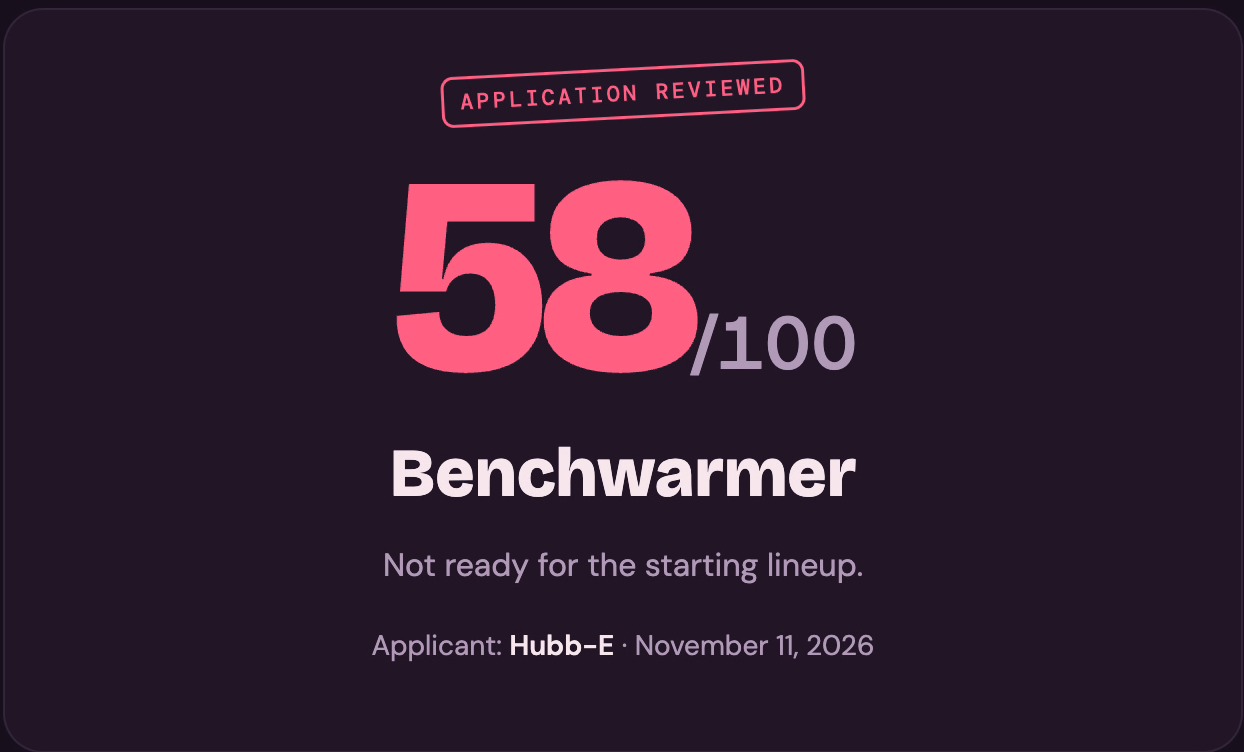
A real result from our first version, dated November 11, 2026: 58 out of 100. Benchwarmer. Not ready for the starting lineup.
The short version
Part 1
Prompt 1 interviews you and hands back one Quiz Brief to paste.
Part 2
Prompt 2 builds a 10, 25 or 50 question page scored to exactly 100, then you send the link.
The reel this guide comes from. 49 seconds, sound on.
Part 1 · Get her quiz brief in 5 to 20 minutes
Claude does the interrogating. Politely.
5 to 20 minutes, depending on the length you pick. Pick who answers and how long, run the interview, and check the brief before anything gets built.
A brief she has read and signed off on, with nothing that helps a stranger find her.
Lesson 1.1 · Pick who, how long, how serious
Three choices. Then the grilling starts.
Needs: The person's first name and pronouns.
What it does
You know your three answers before Prompt 1 asks: who answers, how long, and how serious.
The mode decides who Claude talks to. The person's own answers make the best quiz.
How to do it
Prompt 1 asks this first. Pick the one that fits what you already know.
Mode
Who answers
Best when
A. Fill the gaps
The organizer pastes everything they already know, and Claude only asks about what's missing
You know the person well and have notes
B. Organizer interview
The organizer answers Claude's questions from scratch
You know a lot but nothing is written down
C. Subject interview
The person the quiz is about answers for themselves
You want their real answers, their extra details, and their sign-off
D. Merge two briefs
You paste one brief from the organizer and one from the person
You ran two interviews. The person's own answers win
Then pick a length. It sets how long the interview runs too.
Length
Questions
To take it
Interview
Quick
10
About 2 minutes
About 5 minutes
Standard
25
About 5 minutes
About 10 minutes
Full application
50
About 10 minutes
About 20 minutes
Last, pick how serious: for fun, or a long-term check. A long-term check adds Built to last questions on how he handles a disagreement, what a real apology looks like, money, chores, family, faith and the five-year picture.
Don't
Guess her favorite cake and hope she never reads it.
Do
Run mode C with her, or have her read the brief from mode A or B. She knows her own cake.
One Quiz Brief block: trivia facts with near-miss wrong answers (6 to 20, by length), plus scenario material in her own words.
Prompt 1 only gathers the material. It does not build the quiz, so nothing gets made from half the facts.
How to do it
Open a new chat. Paste Prompt 1 below, word for word.
Answer the first message. Pick a mode, a length and how serious, then give her name and pronouns, the quiz title, and who you are to her.
Answer 2 to 4 questions at a time. Claude goes one section at a time and reflects back what it got.
Give the wrong guesses too. For every fact, add the near misses people usually guess. Those become the trick answers.
Say "wrap it up" when you're done. Claude hands back one block that starts with QUIZ BRIEF.
Prompt 1 · The interview. Paste this into Claude
You're going to interview me so we can build a "Potential Quiz": a fun quiz someone dating (or hoping to date) a specific person takes to see if they measure up, like an official application to date them. It mixes "Know Them" trivia (one right answer: birthday, pets' names, favorite cake) with scenarios from their real life (a best, an okay and a bad answer).

Your only job here is to gather the material and hand back a QUIZ BRIEF. Don't write questions or build anything yet.

STEP 1. Ask me these in one short message:
1. Who is answering?
   A) I'm the organizer and I'll paste what I know. Sort it, then only ask about the gaps.
   B) I'm the organizer. Interview me from scratch.
   C) I'm the person the quiz is about.
   D) I have two briefs to merge. The person's answers win. List every conflict you resolved.
2. How long? Quick: 10 questions (about 2 minutes to take, 5 to interview). Standard: 25 (about 5 to take, 10 to interview). Full application: 50 (about 10 to take, 20 to interview).
3. How serious? For fun, or a long-term check (more on conflict, money, family and the future).
4. Their first name and pronouns, the quiz title (Boyfriend Potential Quiz, Girlfriend Potential Quiz, or your own), and who the organizer is to them.

STEP 2. How to interview
- Ask 2 to 4 questions at a time, one section at a time, like a friend helping plan a fun prank.
- Reflect back what you got in a line. If an answer is vague, ask one sharper follow-up ("She loves food" becomes "What would she order for her last meal?"). Unknown? Mark it and move on.
- For every fact, get the wrong guesses people usually make. For every scenario, get what the perfect partner would do and what would annoy them. Those become the trick and bad answers.
- Mode C: talk to the person as "you", and near the end ask what every quiz taker should know and what's off limits.
- Modes A and B: flag anything they might not want strangers to see, and remind me to run the brief by them.

STEP 3. What to collect
Quick: 6 trivia facts and the 2 richest sections. Standard: 10 facts and 4 sections. Full: 16 to 20 facts and every section. A long-term check always includes Built to last.
1. Snapshot: name, job, what they're known for, vibe, and a 1 to 2 sentence intro. Nothing that helps a stranger find them (no address or workplace name).
2. Know Them trivia: birthday, pets, family who come up a lot, favorite food, cake and coffee order, music, a secret talent, school, a nickname, a favorite show. Each with the right answer and 2 or 3 near misses.
3. Their world: their passion and job, the schedule, insider words a partner should know, how they want support, and what a partner should never do.
4. First dates: who plans, lateness, who pays, phones at dinner, texting, following up, and 3 or 4 dream vacation spots.
5. Respect and red flags: dealbreakers, exes, jealousy, opposite-sex friends, how to treat a server, and respecting a "no".
6. Built to last: how a disagreement should be handled and ended, what a real apology sounds like, how they like to be shown they matter, money habits (saver or spender, splitting bills, debt), chores, family closeness and holidays, faith or values, and kids and the five-year picture.
7. Quiz personality: tone (sweet, savage, roast-y), inside jokes, a closing joke about the organizer ("What would you do if you found out this quiz is a preview of how her big sister will interrogate you?"), and puns from their job for 5 result tiers (a dentist got "Needs a Deep Cleaning").

STEP 4. Hand back the brief
When we're done, or when I say "wrap it up", output one block in exactly this layout so I can paste it into the build prompt:

QUIZ BRIEF
Quiz title:
Quiz length (10, 25 or 50):
How serious (for fun / long-term check):
Person's name and pronouns:
Organizer and relationship:
Intro line:
Tone:
Section names (customized, Know [Name] first):
Trivia facts (fact | correct answer | wrong answers):
Scenario material, by section (in the person's own words where possible):
Dealbreakers:
Vacation options:
Closing joke question:
Result tier names, best to worst, with a one-line verdict each (5):
Accent color or vibe:
Off limits, do not include:
Reviewed by the person? (yes / not yet):
Unknowns:

Then ask whether I want to send it to the person to review before we build.
You know it workedClaude hands back one block that starts with QUIZ BRIEF and asks if you want her to review it.
Don't
Say "she loves food" and move on.
Do
Get specific: what she'd order for her last meal, and what people wrongly guess.
Edits that don't break the page, and the same two prompts for any quiz about one person.
Lesson 2.1 · Build the quiz page
Approve the questions. Claude builds the page.
Needs: The Quiz Brief from Lesson 1.2 and a fresh chat.
What it does
An application-style quiz page that works on phones: the length you picked, scored to exactly 100.
Claude shows you every question first and waits for your OK, so nothing gets built that you haven't read.
How to do it
Open a new chat. Paste Prompt 2 below, word for word.
Add the brief. Paste your Quiz Brief where it says [paste the brief here], at the bottom.
Read every question. Claude lists them by section with the points next to each option, plus the 5 result tiers.
Say OK or ask for edits. Then Claude builds the page and checks the scoring.
Open the link. Claude gives you the link in one line.
Prompt 2 · Build the quiz. Paste this into Claude
Build a "Potential Quiz" from the QUIZ BRIEF at the bottom: one self-contained HTML page (publish it as an artifact if you can), mostly opened on phones from a text message.

LENGTH (follow it exactly)
Write exactly the number of questions in the brief's quiz length (50 if it's missing), 4 options each. If the brief has more material than fits, keep the best and drop the rest.
- 10 questions: 3 sections. 4 trivia, 5 scenarios, 1 closing joke.
- 25 questions: 5 sections. 8 trivia, 15 scenarios, 1 "no wrong answer", 1 closing joke.
- 50 questions: 6 or 7 sections. 16 trivia, 32 scenarios, 1 "no wrong answer", 1 closing joke.
Long-term check: at least a quarter of all questions come from Built to last (3 of 10, 7 of 25, 13 of 50). For fun: one or two at most.
Trivia sits mostly in "Know [Name]", with a few tucked inside other sections (still labeled "Know [Name]").

SCORING
Every question is worth up to 2 points. Show the score out of 100 (points earned over points possible, times 100, rounded), so the top score is exactly 100 at any length.
- Trivia: the correct answer is 2, the rest 0. Wrong answers are near misses (April 20 vs April 2 vs March 20 vs April 12), from the brief's wrong guesses when it has them.
- Scenarios: best (2), okay (1), two clearly bad (0). Bad answers can be funny. Keep all four about the same length so the right one doesn't jump out.
- "No wrong answer": every option is worth 2 (the vacation spots).
- Closing joke about the organizer, always last: the sweetest answer 2, the funny ones 1, the scared one 0.

WRITING
- Build every scenario from the person's real life in the brief, never generic dating advice. The 2-point answer is what the brief says they want.
- Leave out everything under "Off limits" and anything that helps a stranger find them.
- Use the brief's pronouns everywhere, including "She'll know" and "Send her your score". Plain, punchy, short. Options under about 15 words. No em dashes anywhere on the page.

RESULT TIERS
90 and up, 75 to 89, 60 to 74, 40 to 59, under 40, with the brief's tier names and one-liners. The bottom tier ends politely, like "Thank you for applying."

THE PAGE
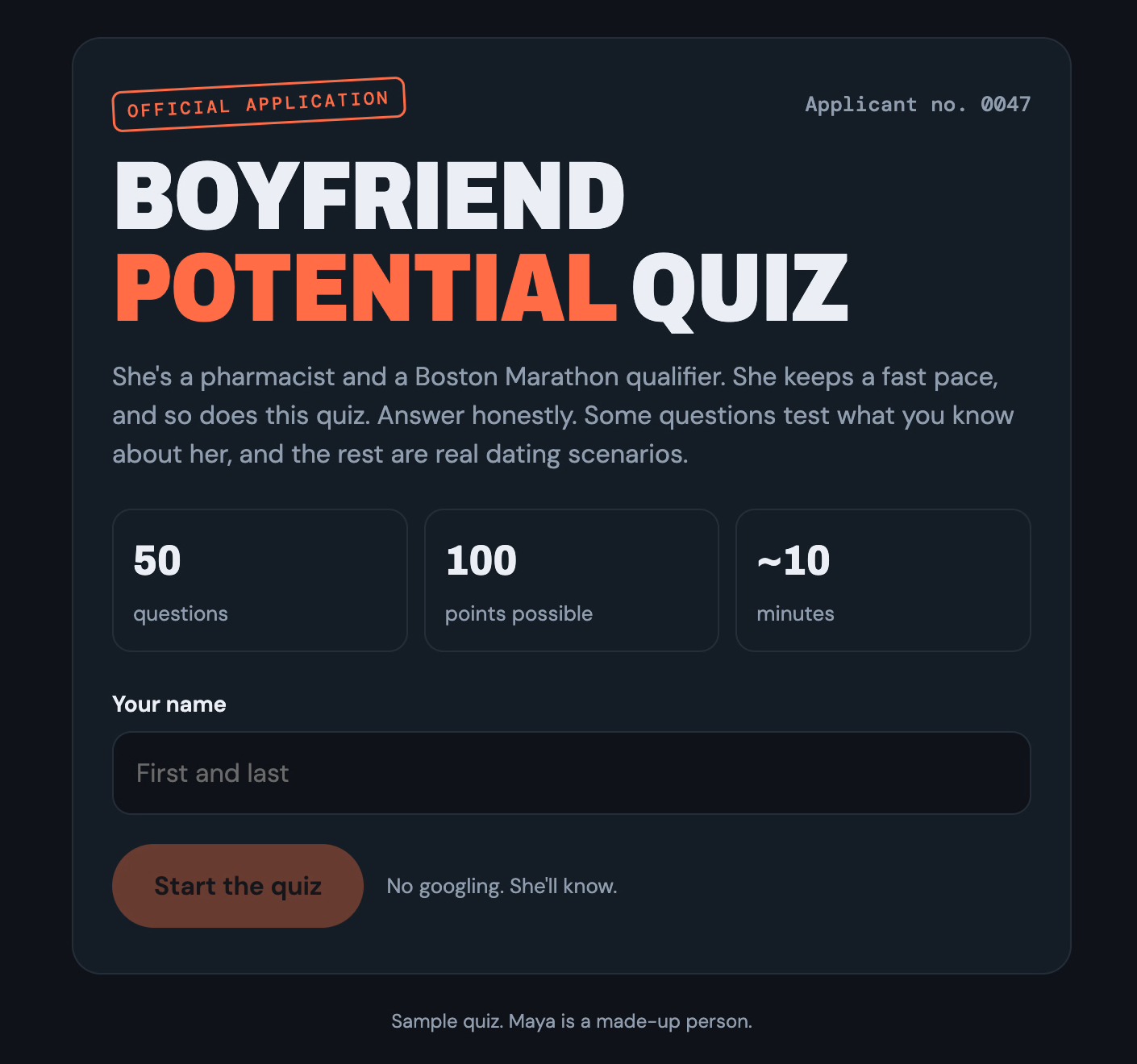
1. Intro card like an official application: a small rotated "Official application" stamp, a big title with one word in the accent color, the intro line, three stat tiles (question count, 100 points possible, about 2, 5 or 10 minutes), a required "Your name" field, a Start button that stays off until a name is typed, and a line like "No googling. She'll know."
2. One question per screen: a section chip (trivia gets its own color), a counter like "3 / 10", a progress bar and four lettered options (A to D). Tapping one highlights it and moves on after a short beat. Add Back and a "Start over" link that needs a second tap.
3. Shuffle each question's options with a fixed seed so the best answer isn't always A and everyone sees the same order.
4. Save progress in localStorage (wrapped in try/catch) so a refresh doesn't lose answers.
5. Results: an "Application reviewed" stamp, the score out of 100, tier, verdict, "Applicant: [name] · [date]", a score-by-section breakdown with bars, and a "Send her your score" card whose "Copy my results" button copies a text summary. If copying fails, show the text in a box to select.
6. Look: one narrow column (about 620px), rounded cards, the brief's accent color, a fun display font and a clean body font from Google Fonts, light and dark mode, big tap targets, no sideways scrolling.
7. Keep all questions in one list near the top of the script, as [section, question, [[option, points], ...]], with the tiers right below, so wording can change without touching anything else.

BEFORE YOU BUILD
Count your questions against the LENGTH split. Then show me every question, numbered and grouped by section, with the points next to each option, plus the 5 tiers and the intro line. Wait for my OK or edits, then build.

AFTER YOU BUILD
Check the question count matches the brief, each question has a 2-point option, the top score is exactly 100, and there are no em dashes. Then give me the link in one line.

QUIZ BRIEF:
[paste the brief here]
Sample quiz at the full 50 question length: Maya is a made-up person. Official application stamp, three stat tiles, a name field and a Start button.
You know it workedClaude confirms the question count, a 2-point option on each, a top score of exactly 100 and no em dashes, then gives you the link.
Don't
OK the build without reading every question.
Do
Read every question, and run anything personal past her first.
A real result from our first version: 58 out of 100. Benchwarmer.
The results screen gives a score, a tier name in her own puns, a breakdown by section, and a Copy my results button.
How to do it
Take the quiz yourself. Type a name and answer every question.
Check the results screen. The score is out of 100, with a tier and a section breakdown.
Send the link. Text it to the next guy before dinner. He copies his results back to you. Benchwarmers stay home.
Low score? Remember Reggie. Two movies later he's the Marine son-in-law who takes out a whole crew to protect the family. People grow. Let him retake it next year.
A real result from our first version, November 11, 2026: Benchwarmer, not ready for the starting lineup.
You know it workedThe Start button stays off until a name is typed, and the top possible score is exactly 100.
Don't
Send it before you've taken it once yourself.
Do
Take it first, so you know every screen works on a phone.
Edits that don't break the page, and the same two prompts for any quiz about one person.
The questions live in one list at the top of the page code, so a change to one question leaves the rest alone.
How to do it
Change a question. In the same chat, say something like "Change question 23's best answer to..."
Make a different quiz. Use the same two prompts for a Girlfriend Potential Quiz, a Best Friend Test or a Roommate Application. Change the title and section names in the brief.
You know it workedClaude updates the one question and the score still tops out at exactly 100.
Don't
Start a new chat to fix one question.
Do
Ask in the chat that built the page, so Claude keeps the whole quiz in view.
This one was obviously for fun. If you'd like to master AI and build useful tools that make you more productive and more profitable, check out more of our resources inside the AI CEO Lab.